Skip to content

SAGARFIVE

  • Linux
  • Networking
  • Git
  • Maven
  • Jenkins
  • Docker
  • Ansible
  • Terrafom
  • AWS
  • SQL
Menu
  • Linux
  • Networking
  • Git
  • Maven
  • Jenkins
  • Docker
  • Ansible
  • Terrafom
  • AWS
  • SQL

SAGAR5

  • Linux
  • Networking
  • Git
  • Maven
  • Jenkins
  • Docker
  • Ansible
  • Terrafom
  • AWS
  • SQL
Menu
  • Linux
  • Networking
  • Git
  • Maven
  • Jenkins
  • Docker
  • Ansible
  • Terrafom
  • AWS
  • SQL

   AWS    AWS Projects    Deploying web Application using CodeCommit, CodeDeploy and CodePipeline(CICD) on AWS    2.3 Connecting Codecommit Repo with local machine using SSH

Projects

 Deploying web Application using CodeCommit, CodeDeploy and CodePipeline(CICD) on AWS

1. Git

  • 1.1 - Download & install git in your local machine
  • 1.2 - Configure git with email and username
  • 1.3 - git clone project

2. CodeCommit

  • 2.1 - Login to AWS Account
  • 2.2 - Create Repository on CodeCommit
  • 2.3 - Connecting Codecommit Repo with local machine using SSH
  • 2.4 - Creating IAM user adding Codecommit policy
  • 2.5 - Generating SSH Token at git bash
  • 2.6 - Upload public at IAM user security credential
  • 2.7 - Creating config file in Git Bash & Verify Codecommit connection
  • 2.8 - Pushing the code to Codecommit & Verifying the code at codecommit Repository

3.  CodeDeploy

  • 3.1 - Create Application on CodeDeploy
  • 3.2 - Create EC2 Instance
  • 3.3 - Create S3ReadOnly IAM Role and attach to EC2 instance
  • 3.4 - Create CodeDeploy IAM Role for CodeDeploy
  • 3.5 - Create Deployment group inside CodeDeploy application

4.  Codepipeline

  • 4.1 - Creating CodePipeline
  • 4.2 - Running the Pipeline

2.3 Connecting Codecommit Repo with local machine using SSH

Sagar

Sagar

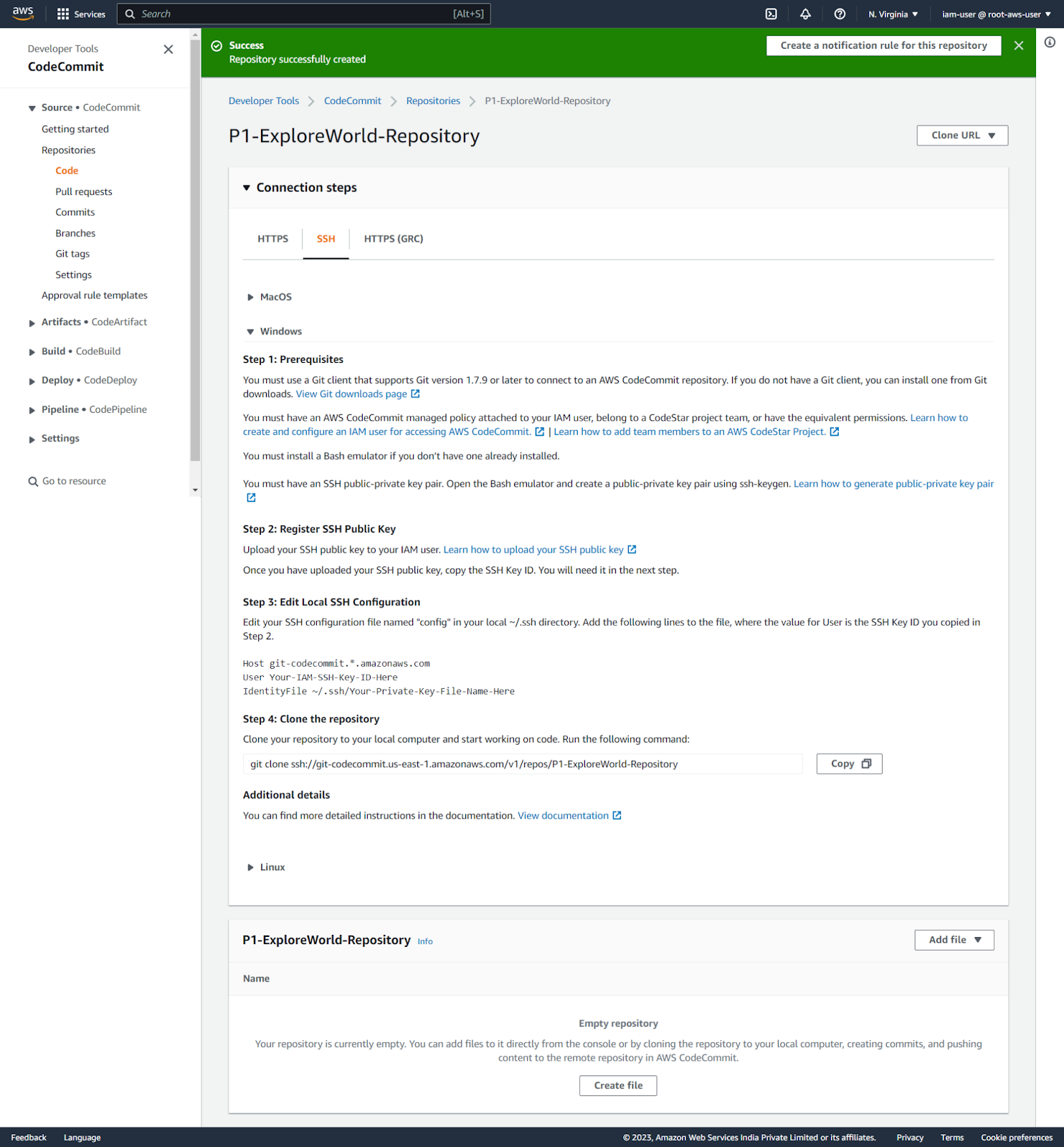
Step 1 – Connection Steps : Once, after the CodeCommit repository is created, it will show the below dashboard/page.  Click on SSH and select your Operating system(in my case windows)

And we need to follow the below instructions to connect/upload  with your local git repository
PrevPrevious2.2 Create Repository on CodeCommit
Next2.4 Creating IAM user adding Codecommit policyNext

Share

Facebook
LinkedIn
WhatsApp
Pinterest
Telegram
Email

Share

sagarfive

– Short Tutorial Notes

All rights reserved